
The Password Wars: Security vs. Productivity
Bob Satyal, Security Officer, Med Tech Solutions
April 29, 2022


It’s often conventional thinking that users must change their passwords at planned intervals such as every 60 or 90 days. After all, there are numerous daily hacking and phishing attempts by threat actors, and forcing a password change seems like the best course of action. Anything else would seem counter-intuitive.
However, the impact of these constant changes on productivity can’t be ignored. The Ponemon Institute says employees spend nearly 11 hours a year entering or resetting their passwords. This is in addition to the lost productivity experienced by users who can’t sign in.
Employees spend nearly 11 hours a year entering or resetting their passwords.
The trouble is that complex password rules actually drive people to create predictable, easy-to-guess passwords (“password1!” anybody?), or to reuse passwords across multiple sites or save them in spreadsheets or Post-it notes. (Who wants to have to think?)
In practice, all those password rules have made it easier for the cybercriminals, and harder—and less secure—for the user, as this XKCD webcomic illustrates.
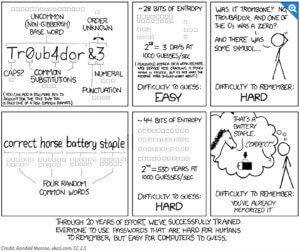
Password rules have made it easier for the cybercriminals, and harder—and less secure—for the user.
Updated password strategies from the experts
NIST revised Special Publication, 800-63-3 in 2017, which removed the guidance to force a password at regular timeframes. The latest guidance as of March, 2022 has some key takeaways:
- NIST increased the character allowance for passwords to 64 characters. The rationale is this allows users to use long passphrases vs. hard-to-remember or recycled passwords.
- Users should not be required to change passwords periodically. The rationale here is that users often recycle or reuse passwords in multiple systems. If one password becomes compromised, it opens the door for a breach across multiple systems. Of course, in the event of a known breach, passwords should be changed immediately.
In 2019 Microsoft also changed its guidance for password rotation. Microsoft no longer recommends forced password changes. (See: Windows 10 Baseline configuration settings.)
Use these updated recommendations to create a balance between utilizing best security practices while minimizing the impact on user productivity.
- Train users to create passwords that are easier to remember but more difficult for the bad guys to decipher. Instead of random strings of characters, instruct them to use unique passphrases that include multiple words. People can test how secure their password strategy is, by entering an example to see how long it would take to hack. (To be safe, we don’t recommend entering actual passwords.) This is a great way for them to see how powerful long, memorable passphrases can be in comparison to random letters and symbols.
- Add multifactor authentication (MFA) wherever possible to ensure you can keep logons secure while minimizing the chance of a forgotten or reused password.
The threat is real
Cybersecurity threats are real. Following the latest cybersecurity guidance, such as using passphrases and multifactor authentication, can minimize risk and prevent breaches. The impact on user productivity and IT departments can also be minimized without compromising security.
Security is always a top concern for our team and MTS offers a full platform of security services to help safeguard your data and networks. Contact us for more ways to help you improve your security posture.