
User Cleanup for Your athenahealth EHR Data
November 9, 2023


Electronic health record (EHR) data cleanup is essential for system performance and user satisfaction. Data cleansing includes fixing or removing incorrect, corrupt, incorrectly formatted, duplicate, or incomplete data from your database. There are many opportunities for data to be duplicated or mislabeled by your users, and identifying these issues and cleaning them can make your EHR system (such as athenahealth) more efficient for your staff and users.
Data cleanup is one of the most overlooked “chores”. Practices skip this when projects and emergent issues take precedence. Failure to maintain your athenahealth EHR system via data cleansing practices can lead to downstream issues. These issues can affect accurate charting and ease of system use.
Like cleaning your home, cleanup priorities may vary. If you find that your system needs major cleaning, and you don’t have the time for that, try prioritizing your organization’s needs so you can create a plan to fix them throughout the year instead of trying to fix everything at once. Eventually, you will want to incorporate regular maintenance into your routine.
Start with low-hanging fruit or quick tasks that your users and staff can easily complete. Move on to areas that might take longer and need coordination.
End User EHR Data Cleaning – Desktop
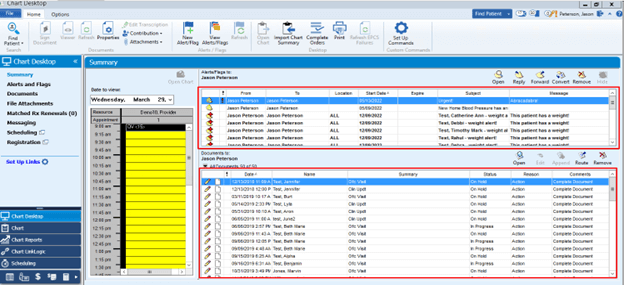
Too many flags and documents on a user’s desktop can slow performance for that user. Your goal should be for all users to have fewer than 100 flags and 100 documents. This is a quick fix that can help avoid slow systems, shaky navigation, and delayed views of patient charts. Admin or EMR managers should run this simple SQL to obtain a list of which users have more than 100 documents or flags monthly. Then you can request the user to clean, act, and sign off on any extra documents and flags.


End User EHR Data Cleaning – Preferences
One user preference that can impact overall system performance is Automatic Schedule Refresh. If you have more than one user scheduling appointments, we recommend updating your schedule preference window with the latest scheduling info before starting to schedule. Within the preference area, users can set up their automatic schedule refresh to be at 30 seconds. Admin or EHR managers can run an SQL to see who has set this schedule refresh interval within their preference.

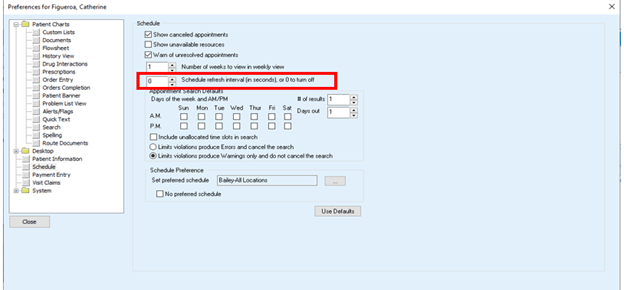
- The area in red highlights the schedule refresh interval in seconds, which should never be at 0.
End User EHR Data Cleaning – Favorites
Does your team use favorites? When a user adds a form to his or her favorites it ‘snapshots’ that form in its current version. Even if a newer form version is imported, users will pull the old snapshot every time they load a form from their favorites. You could have 10 users all pulling in a different version of the same form, which can be a nightmare.
In the example below, you will see that this user has a Vital Signs form in their favorites, but this form is also available within the Forms Windowpane. The form in the favorites pane may be outdated and should not be pulled into any encounter. We encourage users not to save favorites to their favorite windowpane.
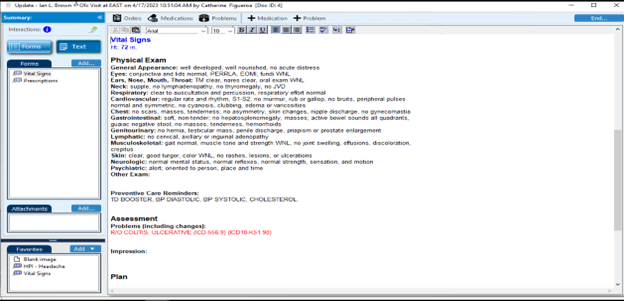
Admin or EMR managers can run the following SQL in your system to give you the information of which users have inactive forms saved to the favorite windowpane. You can follow up with your staff or users to find out why they may have these forms saved and what options they may need going forward.

These cleaning tips will help ensure your system is more efficient for your staff and users. If you need any assistance, we can help. Contact us today to have your athenahealth system inspected and allow us to identify the “cobwebs” and “dust” potentially causing issues in your system that can be cleaned up in your EHR.